Minggu, 28 Maret 2010

THE HACKER'S UNDERGROUND HANDBOOK

Ingin belajar menjadi hacker tapi tidak tahu memulai dari mana? Buku ini adalah salah satu jawabanya. The Hacker's Underground Handbook mengulas berbagai teknik hacking yang populer digunakan. Dari teknik hacking sederhana sampai pada teknik intermediate dan advanced. Disusun oleh David Melnichuk, pendiri blog yang membahas hacking dan keamanan. Anda dapat mengunjungi blognya di http://mrcracker.com.


Daftar isi buku The Hacker's Underground Handbook :

Pendahuluan
- Apa itu Hacker?

- Hacker dan penggolonganya
- Mengapa menjadi seorang Hacker

Pemrograman

- Perlukah mempelajarinya?

- Dimana saya harus memulai?

- Cara belajar terbaik

Password

- Password Cracking

- Phising
- Program-program pencuri password


Network Hacking
- Foot Printing
- Port Scanning

- Banner Grabbing

- Searching the Vulnerabilities

- Penetrating

Wirelless Hacking

- Scanning wireless network

- Cracking WEP
- Packet Sniffing


Windows Hacking

- NetBios

- Cracking windows password


Malware

- Definisi
- Prorat


Web Hacking

- Cross site scripting

- Remote file inclusion

- Local file inclusion


Virus Generator


Mungkin anda berfikir membuat Virus sangat sulit sekali. Membutuhkan keahlian coding atau paling tidak menguasai salah satu bahasa pemrograman windows populer seperti VB atau C++. Namun tidak demikian jika anda memiliki Virus Generator. Dengan Virus Generator, pembuatan virus dapat dilakukan secepat membuat mie instan. Tinggal klik dan klik, maka sebuah virus dengan mudahnya tercipta.
rus generator banyak tersebar di dengan beragam pilihan. Anda bisa mencarinya di forum-forum atau situs bawah tanah. Meskipun virus yang diciptakan dapat dibuah dengan mudah, namun anda tidak bisa meremehkan ketangguhanya. Beberapa virus terkenal di yang banyak menyebar di Indonesia atau di dunia banyak yang dibuat dengan virus generator ini.

Berikut beberapa virus generator yang cukup populer yang dapat anda coba untuk membuat virus dengan mudah:

1. In Shadow Batch Virus Generator


Kemampuan:
- Menginfeksi beragam ekstensi file populer
- Mengaktifkan virus ketika start up
- Mematikan berbagai proses dan service penting
- Mengganti ekstensi file dan menyebarkanya melalui file sharing
- Membuat account administrator baru, mengganti password administrator.
- Mematikan komputer otomatis, mendownload files otomatis, dll


2. JPS Virus Maker


Kemampuan:
- Mematikan regedit, task manager, MS Config dan beragam aplikasi yang membahayakan kelangsungan hidup virus.
- Menonaktifkan anti virus, wordpad, notepad, command prompt, dll
- Menghiden drive, file, dan tombol-tombol penting seperti Shutdown, restart, logoff, dll
- Mematikan monitor, memainkan mouser, membuka CD drive, dll


3. TeraBIT Virus Maker


Kemampuan:
Memiliki beragam kemampuan seperti dua virus generator di atas.


NB: Matikan antivirus saat ingin memakai software ini karena terdeteksi sebagai trojan. . . . . .

Selamat Mencoba

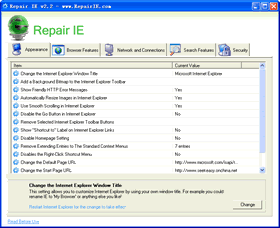
Repair Internet Explorer

Repair IE is a free but powerful repair utility for Internet Explorer, with Repair IE you can safely clean, repair and optimize the Internet Explorer registry with a few simple mouse clicks! By using this repair tool regularly and fixing registry errors your IE browser should not only be more stable but it will also help improve your IE browser performance.
There are times when Internet Explorer will start crashing or producing errors for no apparent reason, especially if your windows system has been infected with spyware, malware and viruses that have damaged your computer, you may find it necessary to fix Internet Explorer from time to time, once the viruses has been removed, you can proceed with a repair of IE.
This program is suitable for Windows 98/ME/XP/Vista systems.


What are Repair IE can do for you?
  • Open Favorites in a new window
  • Disable the Internet Explorer HTML Source Editor Check
  • Change the Download Location for ActiveX Files
  • Open TIF Images with Internet Explorer
  • Show My Pictures Toolbar in Internet Explorer
  • Force Plain Text Format in Internet Explorer
  • Remove Windows Messenger from Internet Explorer
  • Open Internet Explorer Shortcuts in a New Window
  • Launch Browser Windows in a Separate Process
  • Specify the Location of the Online Support Site
  • Control Internet Explorer Error Reporting
  • Disable Internet Explorer Download Notification
  • Specify the Default Internet Explorer Download Directory
  • Use an Alternate Source Viewer with Internet Explorer
  • Change the Auto Complete Mode
  • Disable the Internet Explorer Script Debugger
  • Change Links Folder Name on Toolbar
  • Hide the Internet Explorer Icon
  • Disable Internet Access
  • Use System-Wide Proxy Settings
  • Change the Internet Explorer User Agent String
  • Change the Branded User Agent String
  • Change the Number of Simultaneous HTTP Sessions
  • Internet Explorer FTP Mode
  • Connect to Unicode Addresses with Internet Explorer
  • Change the Default Keep-Alive Time-Out in Internet Explorer
  • Disable Internet Explorer Automatic Proxy Caching
  • Search from the Address Bar in Internet Explorer
  • Change the Default Internet Explorer Search Page
  • Change the Internet Explorer Search Engine
  • Disable the Custom Search Page in Internet Explorer
  • Empty Temporary Internet Files on Exit
  • Internet Explorer Toolbar Restrictions
  • Disable the Ability to Customize Toolbars
  • Restrict Web Sites from Installing Software
  • Disable File Download in Internet Explorer
  • Remove the Option to Change or Hide Toolbars
  • Clear the Windows System HOSTS file
  • Internet Explorer Restrictions
  • Internet Explorer Control Panel Restrictions (Part 1)
  • Internet Explorer Control Panel Restrictions (Part 2)
  • Disable Password Caching in Internet Explorer
  • Disable Caching of Secure Web Pages
  • Use System-based Internet Restrictions
  • Disable Save As Web Page Complete
  • Disable Access to File URLs in Internet Explorer
  • Change the Internet Explorer Window Title
  • Add a Background Bitmap to the Internet Explorer Toolbar
  • Show Friendly HTTP Error Messages
  • Automatically Resize Images in Internet Explorer
  • Use Smooth Scrolling in Internet Explorer
  • Disable the Go Button in Internet Explorer
  • Remove Selected Internet Explorer Toolbar Buttons
  • Show "Shortcut to" Label on Internet Explorer Links
  • Disable Homepage Setting
  • Remove Extending Entries to The Standard Context Menus
  • Disables the Right-Click Shortcut Menu
  • Remove the Content Advisor and Ratings Password
  • Change the Default Page URL
  • Change the Default Search URL
  • Change the Search Bar URL
  • Change the Search Page URL
  • Change the Search Migrated Default Name
  • Change the Search Migrated Default URL
  • Change the Start Page URL
  • Enable Internet Explorer as the default browser
  • Clear the Internet Explorer Typed Address History


Disclaimer

RepairIE will modify some registry settings for Internet Explorer tweaking, modifying the Internet Explorer registry can cause serious problems that may require you to reinstall your operating system. We cannot guarantee that problems resulting from modifications to the registry can be solved. Use this free software at your own risk.

The software is provided "AS IS" without any warranty, either expressed or implied. The author will not be liable for any special, incidental, consequential or indirect damages due to loss of data or any other reason.

Sabtu, 27 Maret 2010

Daftar Blog Berpagerank Tinggi

Bagi teman-teman yang ingin mencari backlink gratis dari situs/blog berpagerank tinggi dan juga dofollow, ini saya punya daftarnya, daftar ini sih hasil dari teman-teman, jadi saya mohon untuk copy-paste artikelnya buat nambah-nambah postingan. nih daftar blog berpagerank tinggi.

blog indonesia
Pagerank 6
http://harry.sufehmi.com

Pagerank 5
http://www.gareng.net

Pagerank 4
http://ningtyasindri.blogspot.com
http://penyuonline.info
http://www.sumintar.com

Pagerank 3
http://www.blogguebo.com
http://fahry.com
http://www.penulislepas.com
http://wawanwae.blogspot.com
http://www.dexno.com
http://semarangreview.blogspot.com
http://oktasihotang.com
http://www.lutfi-rifai.web.id
http://dhimas.web.id
http://www.arhan.web.id
http://www.permanaj.net
http://idebisnisusaha.com
http://kolomkesehatan.blogspot.com
http://www.lutfigoblog.com
http://nichpakaich.net
http://bernard-notes.com
http://awan.wibawa.net
http://danasimpleman.blogspot.com
http://brahmasta.net
http://www.anomtejo.web.id
http://sebuaharti.blogspot.com
http://blog.mriza.web.id
http://utchanovsky.com

Pagerank 2
http://negerihijau.blogspot.com
http://cariuangtambahan.blogspot.com
http://hapebewe.blogspot.com
http://www.bintorobisnis.com
http://klikfan.com
http://www.hilmanpribadi.com
http://tera.sirumah.com
http://www.promobebas.com
http://www.tantan-hilyatana.net
http://wanadamsyah.blogspot.com
http://gudangmusik.blogspot.com
http://harry99.info
http://www.dewahyoe.org
http://sawali.info
http://www.jimmysun.net
http://www.brokencode.biz
http://ristizona.blogspot.com

direktori dofollow berpagerank tinggi
* http://ma.gnolia.com/ PageRank 6
* http://www.mister-wong.com/register/ PageRank 6
* http://www.bunrui.info/ PageRank 5
* http://tweako.com/ PageRank 5
* http://www.indianpad.com/ PageRank 5
* http://www.bibsonomy.org/ PageRank 5
* http://www.addsitelink.com/ PageRank 4
* http://www.linkaddurl.com/ PageRank 4
* http://www.dofollowblogs.com/ PageRank 4
* http://socialogs.com/ PageRank 4
* http://www.bmaccess.net/ PageRank 4

pagerank diatas sih bisa berubah sewaktu-waktu, yup, semoga bermanfaat.( ^_^)
Semoga bermanfaat . . 

Daftar Langsung Dapat $10

Get cash from your website. Sign up as affiliate.

Waktu gue iseng-iseng buka facebook, ternyata ada info dari temen yang ngasih tau ada website yang ngasih duit $10 cuma dengan daftar aja ke web itu. Seru nggak tuh . . . . .!!!

Klo tertarik daftar langsung aja DISINI
Caranya mudah banget kok, kita tinggal isi nama, alamat email, ama alamat web/blog kita. Trus buka aja email kamu ntar disitu bakalan ada username dan password kamu. Tinggal Login deh. . . . .
Klo dah login klik tombol Start yang letaknya aja dibagian kanan atas. Trus klik "Promotion" lalu "Banners and Links". Nah disitukan ada banyak banget contoh iklannya, tinggal pilih deh sesuai keinginan kamu lalu klik"Get banner code". Klo udah tinggal copy paste kodenya ke web/ blog kamu.Sekian dulu dari saya semoga bermanfaat.

Ditunggu komentnya biar tau nih postingan berguna apa kagak. . . . .

Selasa, 23 Maret 2010

Username dan password premium download gratis

Download software, games, movie, templates sepuasnya adalah dambaan setiap pengguna internet. Secara teknis sebenarnya dapat dicari menggunakan Google atau mengunjungi situs-situs warez, DDL atau Nulled, namun terkadang tidak lengkap. Beberapa situs menyediakan fasilitas download cepat seperti Usenext, tapi kita harus mengeluarkan sedikit dollar untuk menebus username dan account premiumnya. Berikut 16 situs download beserta account premiumnya. Gunakan dengan bijak ya!

1). www.divxcrawler.com


Username : divx273
Password : 8342729


2). www.butterflydownloadnetwork.com

Username : cinemanetwork20

Password : butterfly20


3). www.downloadprofessional.com
Username : lo886Ees

Password : zAgt88er


4). www.sharingzone.net

Username : LODMQYHX

Password : 375021402

Receipt : 4T5W89RD


5). www.unlimitedgamedownloads.com

Username : ga20me

Password : ke01feb


6). www.watchdirect.tv

Username : cinemanetwork20

Password : butterfly20


7). www.fullreleasez.com

Username : Af872HskL

Password : XjsdH28N


8). www.fulldownloads.us

Username : Af872HskL

Password : XjsdH28N


9). www.pirateaccess.com

Username : yourfrienddalat@gmail.com

Password : CHh5LKPI


Username : xxx_heel_xxx@yahoo.com

Password : MJY0BUY

Username : i_l0ve_u_786@yahoo.com

Password : rYvLgPrt


Username : mubashar_siddique@yahoo.com

Password : F9Gzgwb5


10). www.warezquality.com

Username : ageg2020

Password : z8fsDfg3


11). wwww.warezreleases.com

Username : HnRPxKQz

Password : a59KBV7


Username : a25bipZP

Password : 1TeVnoJb


Username : SHYyJfWU

Password : P4K20uO


12). www.fulldownloadaccess.com

Username : mpuv3y

Password : umvpy3x


13). www.alphaload.com

Username : AL3429352

Password : ykbcKTNS


Username : AL3429355

Password : RCHAbhKM


Username : AL3429350

Password : gMZNFcyS


Username : AL3429351

Password : cTAkWAxc


Username : AL3429352
Password : ykbcKTNS


14) www.gamedownloadnow.com

Username : ga20me

Password : ke01feb

15). www.unlimiteddownloadcenter.com

Username : cu20me

Password : ke01feb


16). www.tvadvanced.com

Username : mv03dl

Password : frmvdl

Tweak Master Pro 3.04 With Patch

This program differs from other tweaking, above all, a narrow focus. If other optimizers often include a variety of utilities bootblack roster until backup units, TweakMASTER contains only the means to configure the Internet connection.

In general we can say that the program is very complete solution and will be a great helper for those who work a lot on the Internet. It includes virtually all of the tools that they can come in handy - from utilities to synchronize the system time to the means to download Web pages in the background.
  • Connection Optimization Wizard (Wizard optimize connection) This module is a step by step wizard, which allows you to configure the Internet connection is best. This user does not need to set any settings - only need to specify the type of Internet connection and a way to connect to the Internet, and then choose one of three options to optimize (in the program, they are called - option 1, 2 and 3). If optimization has not brought the desired result, you may want to choose another option or with the same master to return to their original settings.
  • Advanced Optimization Settings (advanced settings optimization) If the previous module is designed for novice users and does not require any knowledge about a system like this, rather, more experienced computer scientists. With it you can manually configure some settings network adapter and connect to the Internet. It should be noted that there is a rollback option, which will help in case of selecting the parameters failed to return everything as it was.
  • DNS Accelerator (accelerator DNS) When you enter the site name in a browser window, the program must convert the text into a numeric address. It takes some time, since thiscomputer sends a request to the DNS-server provider, after which he sends it to the server domain. DNS Accelerator module stores this information for sites you visit directly on yourcomputer, which greatly speeds up the work.
  • Connection Speed Measurement (measurement of the speed of communication) module that allows to test the quality of Internet connection.
  • Advanced Ping & TraceRoute - module that allows to detect the source of the problems encountered when using the Internet and local network.
  • Network Connections Viewer - the module for viewing open network connections, TCP and UDP ports in real time.
  • Clock Synchronization - synchronize the system time with the servers of exact time. There is a list of servers to which you can add your own.
  • Keep Connected - module to avoid bursting the Internet connection to your ISP.
  • Smart WhoIs - utility to obtain information about the domain or IP-address.
  • LinkFox - an additional module that allows to speed up surfing at the expense of the autonomous loading of these options.
Would you like to :
  • Automatically optimize and speed up any type of Internet connection.
  • Use advanced, yet easy to use, networking diagnostics and troubleshooting tools.
  • Optimize Internet Explorer and Firefox for snappier web surfing.
  • Be in total control of all networking configuration settings.
  • Specific optimizations for every Windows version from Windows 2000 to Windows 7.
Whats New On TweakMaster 3.04 :
  • TweakMASTER has been updated for a better compatibility with localized versions of Windows Vista and Windows 7 (users of German Windows Vista are the most affected).
  • An optional Ask toolbar has been removed from TweakMASTER installer.
  • Several minor fixes and improvements.
Buat yang sudah request TweakMASTER, langsung aja di download. Okeiii


NB: Tips dari saya, sewaktu ingin mempatch TweakMASTER Pro 3.04, harap disable antivirus nya dahulu. Bagi yang takut, jangan coba tips ini. Okeiii
Download TweakMASTER Pro 3.04 With Patch

Digital Blaster

Q1: Apa itu Digital Blaster?
Digital Blaster adalah sebuah Flooder internet dan jaringan komputer yang bisa didapatkan melalui beberapa media di YogyaFree seperti CD/DVD, www.yogyafree.net maupun di situs penulis (www.geocities.com/ferdianelli/digiblast.html). Digital Blaster disingkat menjadi DigiBlast merupakan hack tool gratis dan bebas untuk disebarluaskan dengan syarat tidak untuk konsumsi profit seperti menjual atau membelinya dari seseorang. Versi terbaru Digital Blaster v1.2.0 built 08.2007 telah di-update pada bulan Agustus 2007. Prinsip kerja program ini adalah mengirimkan paket secara berkala ke sebuah alamat IP dan port-port yang ditentukan.

Q2: Sistem dan instalasi?
Digital Blaster dapat berjalan di Windows 95, 98, XP. Windows Vista tidak mendukung. Ekstrak semua file yang terdapat didalam digiblast.zip dan klik digiblast2.exe.

Q3: Bagaimana cara menggunakan DigiBlast?
Pada versi 1.2.0 built 08.2007, DigiBlast dapat mengirimkan paket ke alamat IP target ke sebuah port yang ditentukan oleh user (“Single Port Flooder”) maupun ke banyak port yang terbuka (“Multi Port Flooder”). Yang perlu anda lakukan untuk mengirimkan paket ke alamat IP target adalah:  Memastikan bahwa alamat IP target aktif dan terhubung ke internet. Dapat anda lakukan di mirc dengan mengetikkan perintah di kolom status : /dns nickname atau
/dns domainsitus. Contoh : /dns poni atau /dns www.yogyafree.net.  Mengetahui port yang terbuka pada komputer target. Anda membutuhkan port scanner. Digital Blaster pada mode Multi Port Flooder bisa menjadi sebuah port scanner.

Mode Single Port Flooder


Isi kolom IP address : alamat IP target.
Contoh :
IP Address : www.indonesia.go.id
Atau IP address yang anda dapatkan dengan mIRC /DNS
IP Address : 125.XXX.XX.XX
Catatan :
Jika anda ingin membanjiri koneksi seseorang di mIRC, anda tidak bisa langsung mengisi nicknamenya langsung di kolom IP address. Anda harus mengetahui terlebih dahulu alamat IP-nya.
Isi Kolom Data To Send : Data
Contoh :
Data To Send : Isikandengankaraktersembarangan
Atau mengirimkan permintaan kepada server
Data To Send : GET / HTTP/1.1
Isi Kolom Port : Port
Contoh :
Port : 110
Maka program akan konek ke port 110 dan membanjiri port tersebut dengan data
paket.
Port yang terbuka pada windows pada umumnya adalah 25, 110, 135, 389, 1025.
Isi Kolom Repeat : Jumlah paket yang akan dikirim ke target
Contoh :
Repeat : 100000
Maka DigiBlast akan mengirimkan seratus ribu kali paket ke komputer target
Catatan : Times Left menunjukkan jumlah paket yang tersisa.
Isi Kolom Delay : interval waktu pengiriman paket per detik
Contoh :
Delay : 1000
maka interval waktu pengiriman paket adalah 1 detik = 1 paket. Jika angka Delay
semakin kecil maka paket yang dikirimkan akan semakin banyak setiap detiknya. Batas
minimal Delay = 1.
Ceklis Flood Mode
TCP FLOOD – Paket dikirimkan melalui protokol TCP/IP
UDP FLOOD - Paket dikirimkan melalui protokol UDP
DUAL PROTOCOL FLOOD - Paket dikirimkan melalui protokol TCP/IP dan UDP
Klik Flood untuk membanjiri , Halt atau Cancel untuk menghentikan. Clear untuk menghapus laporan.

Mode Multi Port Flooder

Multi Port Flooder berfungsi untuk mengirimkan paket ke semua port yang terbuka pada komputer target. Program akan mencoba mencari port-port yang terbuka pada komputer target untuk melakukan koneksi melalui protokol TCP/IP. Mode Multi Port Flooder tidak hanya berfungsi sebagai flooder tetapi juga sebagai port scanner Isi kolom Port/Time : Jumlah Port per koneksi
Contoh
Port/Second : 100
maka program akan mencoba melakukan koneksi sebanyak seratus port secara berurut sesuai dengan yang telah ditentukan user
Isi kolom Port: port awal To: port akhir
Contoh

Port: 20 To: 1000
Maka program akan mencoba melalukan koneksi mulai dari port 20 s/d port 1000
Ceklis Don`t Stop Me To Flood
Don`t Stop Me To Flood – Program akan terus melakukan koneksi ke komputer target tanpa berhenti. Jika ceklis dihilangkan, maka program akan berhenti setelah pengiriman paket selesai sesuai dengan Port: port awal To: port akhir yang telah ditentukan oleh user. Klik Flood untuk membanjiri , Halt untuk menghentikan. Clear untuk menghapus laporan.

Buat softwarenya silahkan download disini.

Dikutip dari:xcode_magazine edisi8

Kamis, 18 Maret 2010

Harga dan Spesifikasi Apple iPad

 iPad adalah komputer tabled yang baru saja dirilis oleh Apple. Pada tanggal 27 januari 2010 kemarin, di San Fransisco. Seperti kita ketahui bahwa gosip teknologi di tahun 2010 ini adalah jamannya komputer tabled. iPad kini menjadi bahan gosip para pencinta gadget. iPad adalah perangkat komputer jinjing diantara laptop dan smartphone. Disebut juga komputer tabled. Modelnya keren banget deh. Agak mirip dengan iPhone namun iPad lebih besar lagi bentuknya dengan layar yang lebar.


Apple menawarkan iPad dalam enam varian dengan kisaran harga dari 499 hingga 829 dollar AS. Hal tersebut tergantung ukuran memori yang tersedia dalam 3 pilihan, yakni 16 GB, 32 GB, dan 64 GB, serta dua pilihan model masing-masing hanya dengan koneksi WiFi atau WiFi dan 3G GSM. Untuk sementara iPad baru tersedia di AS. Namun, dalam 2-3 bulan
akan dikirimkan ke seluruh dunia.


Berikut spesifikasi Apple iPad :

Ukuran:

- Panjang: 24,8 cm

- Lebar: 18,97 cm

- Tebal: 1,34 cm

- Berat: 0,68 kg (WiFi model) dan 0,73 kg (WiFi + 3G model)


Layar:

- 9,7 inci LED backlit glossy widescreen multitouch dengan teknologi IPS

- Resolusi 1024x768 pixel dengan 132 pixel per inci

- Dilapisi fingerprint resistant oleophobic

- Mendukung penulisan banyak bahasa dan karakter secara bersamaan


Kapasitas memori:

- Flash drive 16 GB, 32 GB, atau 64 GB


Prosesor :

- Apple A4 1 GHZ


Sensor:

- Akselerometer

- Ambient light sensor


Baterai:

- Baterai Lithium polymer

- Daya tahan hingga 10 jam waktu aktif dan satu bulan waktu standby


Audio playback:

- Mendukung format AAC (16 hingga 320 Kbps)

- Mendukung format Protected AAC (16 hingga 320 Kbps)

- Mendukung format MP3 (16 hingga 320 Kbps)

- Mendukung MP3 VBR, Audible (format 2,3, dan 4), Apple Losless, AIFF, dan WAV


Koneksi:

Untuk WiFi model

- WiFi 802.11 a/b/g/n

- Bluetooth 2.1 + teknologi EDR


Untuk WiFi + 3G model

- UMTS/HSDPA triband (850, 1900, dan 2100 MHz)

- GSM/EDGE quabband850, 900, 1800, dan 1900 MHz)

- WiFi 802.11 a/b/g/n

- Bluetooth 2.1 + teknologi EDR


Input dan output
- Dock connector

- 3,5 mm stereo headphone jack

- Built in speaker

- Microphone

- SIM card tray (untuk model WiFi + 3G)


Layanan berbasis lokasi

- WiFi

- Kompas digital

- Assisted GPS (khusus model WiFi + 3G)

- Seluler (khusus model WiFi + 3G)


TV dan video

- Mendukung format video H.264 hingga 720p, .m4v, .mp4, .mov, MPEG-4.


Tombol eksternal

- On/off/sleep/wake

- Mute

- Volume naik atau turun


Fitur dan Aplikasi utama:

- Browser Safari untuk akses web.

- Mail untuk membaca e-mail.

- Photos untuk mengelola arsip foto.

- Video untuk memutar file video.

- YouTube untuk melihat video langsung ke YouTube tanpa melalui webnya.

- iPod untuk memainkan musik

- iTunes untuk mengunduh musik dan video

- App Store untuk mengunduk aplikasi

- iBooks untuk membaca dan mengunduh e-book dari iBooks Store

- Maps untuk melihat peta resolusi tinggi dari satelit dan Street View Images.

- Notes untuk membuat catatan bebas.

- Calendar untuk membuat agenda.

- Contacts untuk mencatat data telepon, email, dan web teman.

- Home screen untuk mengatur tampilan layar

- Spotlight search untuk melakukan pencarian cepat di semua bagian hanya dengan mengetikkan keyword.

Download Anti Keylogger

Download anti keylogger gratis, apaan tuh ? Tahu Keylogger kan? Salah satu software yang digunakan para hacker untuk bisa mendapatkan account email anda. Yah, bila anda pernah menemukan kasus friendster atau facebook di hack.
Keylogger inilah salah satu penyebabnya. Keylogger ini berfungsi untuk merekam aktivitas yang dilakukan di keyboard komputer anda. Biasanya ditujukan pada komputer publik alias warnet. Apapun yang anda ketikkan di keyboard akan terekam di software keylogger mereka. Jadi berhati-hatilah main di warnet. Berhati-hatilah memasukkan id dan password email penting anda di warnet. Bisa saja komputer yang anda mainin itu ada keyloggernya.

Untuk itu Belajar Hack coba beri solusi nih, dengan Software Anti Keylogger. Anda bisa download anti keylogger ini dengan gratis. Link downloadnya ada di bawah, di baca aja dulu basa-basi ini yah, hihihi.

Ok sekarang anda bisa download anti keylogger gratis di bawah ini :


DOWNLOAD ANTI KEYLOGGER


Total Tayangan Halaman

BANNER

Belajar Hack Copyright © 2009 Premium Blogger Dashboard Designed by SAER

WELCOME TO BELAJAR HACK | BLOG BUAT ORANG-ORANG YANG INGIN BELAJAR HACKING | TIPS TRICK | DOWNLOAD SOFTWARE GRATIS FULL VERSION